You Might Be Vibe Coding Wrong If These Files Aren’t There
Six documents for the people and six context files for the AI: a practical way to stop guessing, track progress and build a business website with decisions written down.
By Emmanuel Itighise
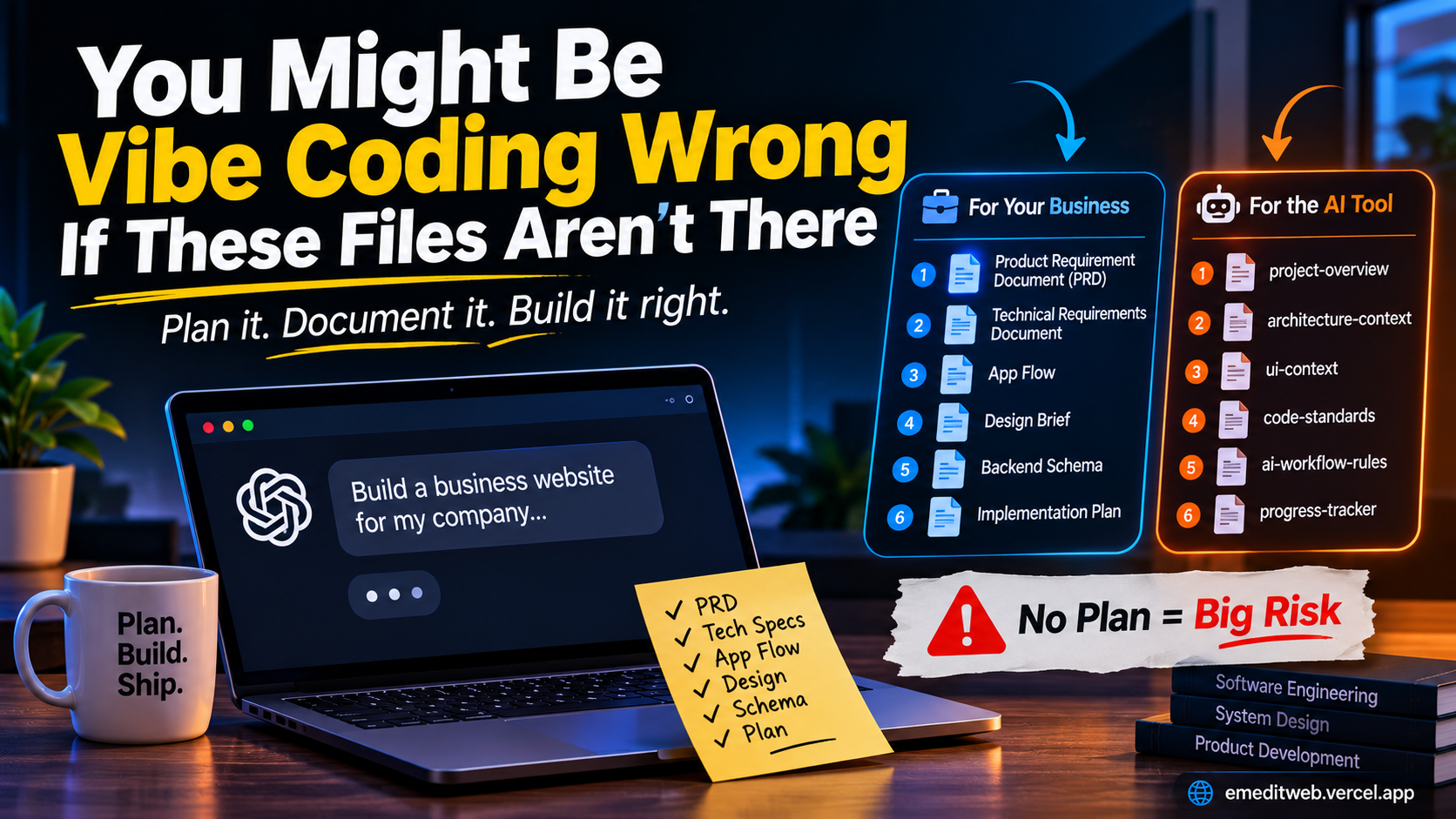
Vibe coding is fast. You describe what you want, the AI writes it, you look at the result and you describe the next thing. For a weekend project that works fine. For a business website that real customers will use, it is a trap.
The trap is not the AI. It is starting with nothing written down. If the only plan for your product lives in your head and in a chat window, every new prompt is a fresh guess. The tool forgets what it decided an hour ago, the colours drift, the database gets reshaped halfway through and nobody can say what was finished last week.
The fix is boring and cheap: write things down first. There are two sets of six files that do this. The first set is for the people (you and whoever builds it). The second set is for the AI tool itself.
Set one: the six documents behind any business website
If someone offers to vibe code your business website, ask to see these six documents first.
-
Product requirement document (PRD). It says what the product does, feature by feature. Who is it for, what can they do, and what is out of scope for now. Without it, “the website” means something different to everyone involved.
-
Technical requirements document. It lists the tools the product is built on: the framework, the hosting, the database, the payment provider, the email service. The point is that nobody guesses halfway through. A project that starts in one stack and quietly switches to another in week three is expensive.
-
App flow. It describes what happens when someone clicks and which page comes next. Sign up, log in, forgot password, checkout, what happens on an error. Most bugs customers notice are gaps in the flow, not broken buttons.
-
Design brief. It holds your colours and fonts and how every screen should look so the product stays on brand. AI tools are happy to invent a new style for each page unless you tell them not to.
-
Backend schema. It says where your client data lives, who can see it and how the pieces connect. For a business this is the most serious document on the list. Customer data placed carelessly is a legal and reputational problem, not just a technical one.
-
Implementation plan. It sets out what gets built in which order. Foundations first, then the core feature, then the extras. It turns a big vague job into steps you can check off.
The good news is that whoever builds the site for you can draft all six with Claude. You do not need to write them from scratch. You need to read them, correct them and agree to them before any code exists. That review is where you catch the wrong assumptions while they still cost nothing to fix.
Set two: the six files for the AI tool
Documents written for people are not enough, because the AI tool has a limited memory. It cannot hold your whole project in its head across a long session, and each new session starts with nothing. The second set of six files is how you give it a memory. These are the names from the transcript:
project-overview: what the product is, who it is for and what success looks like. This is the first file the AI should read.architecture-context: how the system is put together, which parts talk to which and where the data lives.ui-context: the design rules the AI must follow, such as colours, fonts, spacing and component style.code-standards: how code should be written in this project, such as naming, structure and what to avoid.ai-workflow-rules: how the AI should behave while working. For example: read the overview first, plan before coding, make small changes, do not touch unrelated files and ask when unsure.progress-tracker: what is done, what is in progress and what is next, updated after every session.
My reading of how the two sets fit together:
- The PRD feeds
project-overview. - The technical requirements and the schema feed
architecture-context. - The design brief feeds
ui-context. - The implementation plan feeds
progress-tracker. code-standardsandai-workflow-rulesare the ones that don’t come from the first set, because they describe how to build rather than what to build.
A tiny progress-tracker example
This is the file people skip and then regret. It can be this simple:
# Progress tracker

## Done
- Project set up, database connected
- Sign up and log in working

## In progress
- Checkout page (payment not wired yet)

## Next
- Order confirmation email
- Admin view of orders

## Decisions
- Using email and password login for now, social login later
At the start of every session the AI reads this and knows where things stand. At the end it updates it. That one habit stops the “wait, did we already build this?” loop.
How to get all of it fast
Start a chat with Claude, describe the business and ask it to draft the PRD first. Read it. Fix it. Then ask for the technical requirements, the app flow, the design brief, the schema and the implementation plan, one at a time, each time checking the new document against the earlier ones. Once the six are agreed, ask Claude to turn them into the six AI files and put them in the project folder. Then start building, and have the AI read the files at the beginning of every session.
The honest limit
Documents do not make the AI perfect. It will still make mistakes, and you still need someone who can read the code and test the product. What the files do is shrink the number of mistakes that come from guessing. They turn “build me a website” into a set of decisions that were made deliberately and written down.
A quick check
If you are about to hire someone to vibe code your business site, or you are doing it yourself, ask:
- Is there a PRD I can read?
- Do we know the tools it will be built on?
- Is the user flow written down?
- Is the design brief in a file, not a mood?
- Do we know where customer data lives and who can see it?
- Is there an order of work?
- Do the AI context files exist, and does the tracker get updated?
If most of the answers are no, you are not saving time by skipping them. You are borrowing it, and the bill arrives later.
About the author

Emmanuel Itighise
Founder of Stepfi-App, @Pulsar-Stellar/sdk, and Trybe.
Emmanuel Itighise, known online as Emeditweb, is a full-stack and AI-native developer based in Lagos, Nigeria. He builds practical products and developer tools, with a focus on web applications, AI, and the Stellar ecosystem. He shares lessons from building in public, contributing to open source, and turning ideas into working software.